Most businesses think of their website as a marketing tool.
It introduces the company, describes services, answers a few questions and hopefully convinces someone to call, request a quote or make a purchase.
But what happens behind the scenes?
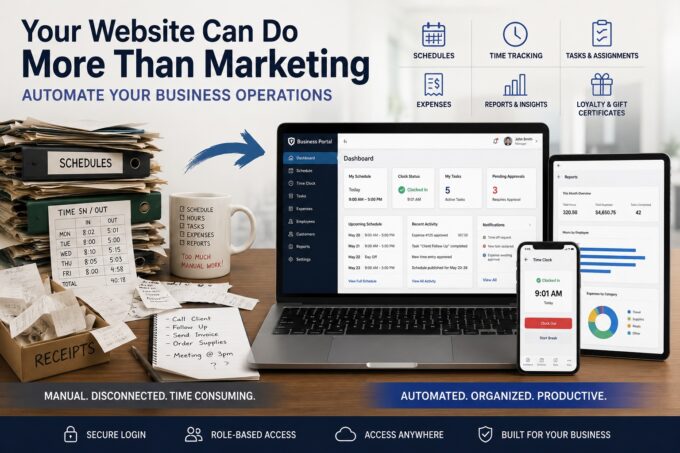
Are you still creating employee schedules on paper or spreadsheets?
Do employees punch in and out on paper while someone manually adds up their hours?
Are assignments given verbally, by text message or in a group chat — followed later by disagreements over what was requested and when?
Are receipts still collected in a box until someone has time to sort through them?
Are you paying for several different monthly subscriptions just to manage relatively simple parts of your business?
Meanwhile, you already have a powerful piece of technology sitting at the center of your online presence:
Your website.
And it can do considerably more than advertise your business.
Your Website Can Have Two Sides
Your existing public website doesn’t have to change its purpose.
Customers can continue using it to find your business, learn about your services, browse products, request estimates, make appointments or contact you.
But behind that public website can exist an entirely different environment:
a secure business portal available only to authorized users.
Employees can log in and see their schedules, assignments and responsibilities.
Managers can create schedules, assign work, approve requests and monitor progress.
Owners can access reports, expenses, operational information and administrative controls.
Customers or vendors can even have their own restricted areas when appropriate.
One website can serve two very different purposes:
Public Website
Marketing → Services → Products → SEO → Leads → Customers
Secure Business Portal
Employees → Managers → Owners → Vendors → Customers
Scheduling • Timekeeping • Tasks • Expenses • Inventory • Reports • Documents • Loyalty Programs • Gift Certificates • Notifications
The public sees your business.
Your team uses the same technology to run it.
Automate the Things You Already Do Every Day
Business automation doesn’t necessarily mean robots, artificial intelligence or replacing your employees.
Often, automation simply means taking something your business does repeatedly and making it easier, faster and more predictable.
Employee Scheduling
Instead of maintaining a spreadsheet or posting a paper schedule, management can create schedules through the website.
Employees log in from their phones or computers to see when they work. Changes can be recorded, schedules can be archived and notifications can be sent when necessary.
No more photographing the schedule hanging on the wall.
Clock-In and Clock-Out
Employees can clock in and out through a secure interface.
The system can automatically calculate hours, identify missed punches, record adjustments and prepare information for management or payroll processing.
Instead of someone spending hours adding numbers together, the information is already organized.
Assignments and Accountability
Verbal instructions have an unfortunate tendency to become:
“That’s not what you told me.”
A simple assignment system creates a record.
Each task can have a description, responsible employee, deadline, priority, comments and completion status.
Now everyone knows what needs to happen, who is responsible and when it is expected to be completed.
Recurring Duties and Checklists
Many businesses perform the same tasks every day, week or month.
Opening procedures. Closing procedures. Cleaning schedules. Equipment inspections. Vehicle checks. Inventory counts. Safety checks. Maintenance.
Instead of relying on someone’s memory, the system can automatically generate recurring tasks and record their completion.
If something needs to happen every Monday, your website can make sure it appears every Monday.
Turn the Shoebox of Receipts Into Organized Data
Expense tracking is another process that often remains surprisingly manual.
A custom business tool can allow an employee or manager to upload a receipt, enter or verify the amount, select a category and submit the expense.
Management can review and approve it.
Accounting can access the information later.
Receipts become searchable records rather than pieces of paper waiting in a box.
This doesn’t mean recreating sophisticated accounting software. QuickBooks and other specialized platforms exist for a reason.
The goal is to automate your internal process of getting accurate information into the right hands.
Different People Can Have Different Access
A secure business portal doesn’t mean every employee gets access to everything.
Permissions can be based on roles.
An employee might see:
My Schedule • My Tasks • Clock In/Out • My Requests
A manager might see:
Team Schedule • Assignments • Time Records • Approvals • Operational Reports
An owner might see:
Operations • Expenses • Employee Data • Reports • Administration
An accountant, vendor or customer can have an entirely different level of access.
Everyone works through the same system while seeing only the information and controls appropriate for their role.
Your Customers Can Benefit From Automation Too
Business automation doesn’t have to stop with employees.
The same system can automate customer-facing processes.
Loyalty Programs
Customers can register online and receive an account, membership number or QR code.
Purchases can earn points or discounts automatically. Rewards can follow rules established specifically for your business rather than the limitations of a generic loyalty platform.
Secure Gift Certificates
Your website can generate unique gift certificates with secure numbers, barcodes or QR codes.
Certificates can be printed in-house or delivered electronically. The system can track their original value, remaining balance and redemption history while preventing the same certificate from being redeemed repeatedly.
Appointments and Reservations
Customers can see availability, make reservations and receive confirmations or reminders.
Employees see the same information internally without having to transfer appointments from phone calls into another calendar.
Customer Portals
Depending on the business, customers can securely access their orders, appointments, estimates, project progress, documents, invoices or other relevant information.
Stop Paying for Five Systems That Don’t Talk to Each Other
Modern businesses often accumulate software subscriptions one problem at a time.
One service handles scheduling.
Another tracks employee time.
Another manages tasks.
Another provides forms.
Another runs the loyalty program.
Another creates reports.
The problem isn’t just the combined monthly cost.
Each system has separate accounts, permissions, interfaces and data. Employees have to learn multiple systems, and information frequently has to be manually transferred between them.
A custom web application doesn’t need to replace every specialized product your company uses.
Instead, your website can become the glue connecting the processes that are unique to your business.
It can also integrate with outside services when using an established platform makes more sense than reinventing it.
Don’t Change Your Business to Fit the Software
Off-the-shelf software usually works one way:
Here is how our software works. Change your process to fit it.
Custom business automation approaches the problem from the opposite direction:
How does your business work?
Perhaps your process is:
Employee submits → Manager reviews → Owner approves → Accounting receives → Employee is notified
Then the software can follow that process.
Another company might need:
Customer orders → Production receives → Employee completes → Manager inspects → Customer is notified
That can become the workflow instead.
The software follows the business instead of forcing the business to follow the software.
You Don’t Have to Automate Everything at Once
The words custom business software can make a project sound unnecessarily enormous and expensive.
It doesn’t have to be.
Start with one process that wastes time every week.
Perhaps that’s employee scheduling.
Then it can grow:
Scheduling
↓
Scheduling + Timekeeping
↓
+ Assignments
↓
+ Expense Tracking
↓
+ Inventory
↓
+ Customer Loyalty
↓
+ Management Reporting
A useful business system can evolve alongside the company instead of requiring everything to be designed and implemented at once.
What About AI?
Artificial intelligence can certainly become part of business automation.
AI can help classify uploaded receipts, summarize reports, search internal documentation, draft responses, identify unusual activity or turn a manager’s instructions into structured assignments.
But good business automation doesn’t require AI.
Sometimes the most valuable automation is much simpler.
Eliminate a spreadsheet.
Eliminate a calculation someone performs every Friday.
Eliminate entering the same information into three different systems.
Eliminate a phone call that never needed to happen.
Eliminate the piece of paper everyone keeps losing.
That’s automation too.
Your Website Can Become Part of Your Business Infrastructure
Most companies think of their website as something that sits outside the business and talks to customers.
It doesn’t have to.
The same web technology can work inward — connecting employees, managers and owners, recording what happened, automating repetitive work, organizing information and making everyday operations more predictable.
And you may already have the foundation.
Before subscribing to another piece of software, consider a different question:
What are we still doing manually that our website could be doing for us?
At Shipilin, we design and develop custom web-based business tools around the way your company actually operates.
Tell us how you currently handle a process — even if today it’s a spreadsheet, clipboard, group text or shoebox full of receipts.
We can help determine whether it can become a practical, secure and automated part of your existing website.
FAQ
Can my existing website really be used to automate business operations?
Yes. In many cases, your existing website can be expanded with a secure, private area for employees, managers, owners, customers, or vendors. The public website continues serving customers while the protected side handles internal business processes.
What types of business tasks can be automated through a website?
Almost any predictable, repeatable process can potentially be automated. Common examples include employee scheduling, clock-in and clock-out, task assignments, expense tracking, approvals, inventory, recurring checklists, customer loyalty programs, gift certificates, reservations, document management, notifications, and reporting.
Is a custom business portal secure?
It can be designed with secure authentication, encrypted connections, role-based permissions, activity logging, and other safeguards. Employees can be limited to their own information while managers and owners receive access appropriate to their responsibilities.
Do I need to replace the software my business already uses?
Not necessarily. A custom web application can replace inefficient manual processes while continuing to work alongside accounting, payroll, CRM, payment processing, and other specialized systems. Where appropriate, existing services can also be integrated with your website.
Is custom business automation expensive?
It depends on the complexity of the process, but automation doesn’t have to begin as a large software project. A business can start by automating one time-consuming task and gradually add additional tools as they become useful.
Do employees need to install an app?
Usually not. A web-based business portal can work through a secure browser on computers, tablets, and smartphones. For some applications, additional mobile or app-like functionality can also be added.
Can different employees have different levels of access?
Yes. Role-based access can determine exactly what each person can see and do. An employee might only see their schedule and assignments, while a manager can manage the team and an owner can access financial and operational reports.
How do I know what parts of my business are worth automating?
Look for processes that are repetitive, require duplicate data entry, depend on paper or spreadsheets, frequently cause mistakes, or consume employee and management time. If you find yourself saying, “We do this the same way every day,” it’s usually worth investigating whether it can be automated.